请注意,本文编写于 153 天前,最后修改于 119 天前,其中某些信息可能已经过时。
目录
使用docker刷下行流量
dockerversion: '3.8'

services:
  traffic-keeper:
    image: alpine:latest
    container_name: network-no-limit
    restart: unless-stopped
    # 已删除 env_file 配置(不需要 .env 文件)
    environment:
      # 下载限制速率(根据带宽调整,如 5M=5MB/s)
      LIMIT_RATE: 10M
      # 下载任务间隔时间(单位:秒)
      SLEEP_MAX: 3000
      RUN_TIMES_MAX: 3
      CONNECT_TIMEOUT: 15
      MAX_TIME: 3600
      RETRY: 5
      RETRY_DELAY: 10
      USER_AGENT: Mozilla/5.0 (Windows NT 10.0; Win64; x64) AppleWebKit/537.36 (KHTML, like Gecko) Chrome/120.0.0.0 Safari/537.36
      # 多个稳定下载直链(已替换为大厂CDN,避免403)
      DOWNLOAD_URLS: |
        http://updates-http.cdn-apple.com/2019WinterFCS/fullrestores/041-39257/32129B6C-292C-11E9-9E72-4511412B0A59/iPhone_4.7_12.1.4_16D57_Restore.ipsw
        https://mirrors.aliyun.com/ubuntu-releases/22.04.5/ubuntu-22.04.5-desktop-amd64.iso
        https://mirrors.tuna.tsinghua.edu.cn/ubuntu-releases/22.04.5/ubuntu-22.04.5-desktop-amd64.iso
    volumes:
      - /etc/localtime:/etc/localtime:ro
      - /etc/timezone:/etc/timezone:ro
    logging:
      driver: "json-file"
      options:
        max-size: "5m"
        max-file: "3"
    tmpfs:
      - /tmp
    command:
      - /bin/sh
      - -c
      - |
        # 替换为阿里云源,加速安装 curl
        sed -i 's/dl-cdn.alpinelinux.org/mirrors.aliyun.com/g' /etc/apk/repositories
        apk add --no-cache curl
        echo "流量保镖服务启动...开始平衡你的上下行比例"

        # 处理下载链接列表(去重、清理空格)
        printf "%s\n" "$$DOWNLOAD_URLS" | tr ',;' '\n' | awk 'NF{gsub(/^[ \t]+|[ \t]+$/,""); if(!seen[$$0]++) print $$0}' | tee /tmp/urls.list
        URL_COUNT=$$(wc -l < /tmp/urls.list)
        echo "$$(date +'%F %T'): 已加载$${URL_COUNT}个链接"

        # 生成随机数函数(兼容 Alpine sh)
        rand_n() {
          max="$$1"
          if [ -r /dev/urandom ]; then
            num=$$(od -An -N2 -tu2 /dev/urandom 2>/dev/null | tr -d ' ')
            echo $$(expr $${num} % $${max} + 1)
          else
            seed=$$(date +%s)
            echo $$(expr $${seed} % $${max} + 1)
          fi
        }

        # 选择可用链接(先探测状态码)
        choose_working_url() {
          lines=$$(wc -l < /tmp/urls.list)
          attempts=0
          while [ $${attempts} -lt $${lines} ]; do
            n=$$(rand_n "$${lines}")
            url=$$(sed -n "$${n}p" /tmp/urls.list)
            code=$$(curl -s -I -L -o /dev/null -w "%{http_code}" --connect-timeout "$$CONNECT_TIMEOUT" --max-time "$$CONNECT_TIMEOUT" "$${url}")
            case "$${code}" in
              2*|3*) echo "$${url}"; return 0 ;;
            esac
            attempts=$$(expr $${attempts} + 1)
          done
          sed -n "$$(rand_n "$${lines}")p" /tmp/urls.list
        }

        # 主循环:随机下载 + 随机休息
        while true; do
          RUN_TIMES=$$(rand_n "$$RUN_TIMES_MAX")
          echo "$$(date +'%F %T'): 本轮将连续执行$${RUN_TIMES}次下载任务..."

          i=1
          while [ $${i} -le $${RUN_TIMES} ]; do
            URL=$$(choose_working_url)
            echo "$$(date +'%F %T'): 执行第$${i}/$${RUN_TIMES}次下载任务..."
            echo "$$(date +'%F %T'): 使用链接: $${URL}"
            nice -n 10 curl -L -o /dev/null \
                 -sS \
                 --limit-rate "$$LIMIT_RATE" \
                 -H 'Cache-Control: no-cache' \
                 -A "$$USER_AGENT" \
                 --connect-timeout "$$CONNECT_TIMEOUT" \
                 --max-time "$$MAX_TIME" \
                 --retry "$$RETRY" \
                 --retry-delay "$$RETRY_DELAY" \
                 -w "\n结果: 耗时%{time_total}s | 均速%{speed_download}B/s | 状态%{http_code}\n" \
                 "$${URL}" || \
                 echo "第$${i}次下载异常,继续执行下一次..."
            i=$$(expr $${i} + 1)
          done

          RANDOM_SLEEP=$$(rand_n "$$SLEEP_MAX")
          echo "$$(date +'%F %T'): 本轮$${RUN_TIMES}次任务执行完毕,随机休息$${RANDOM_SLEEP}秒..."
          sleep $${RANDOM_SLEEP}
        done
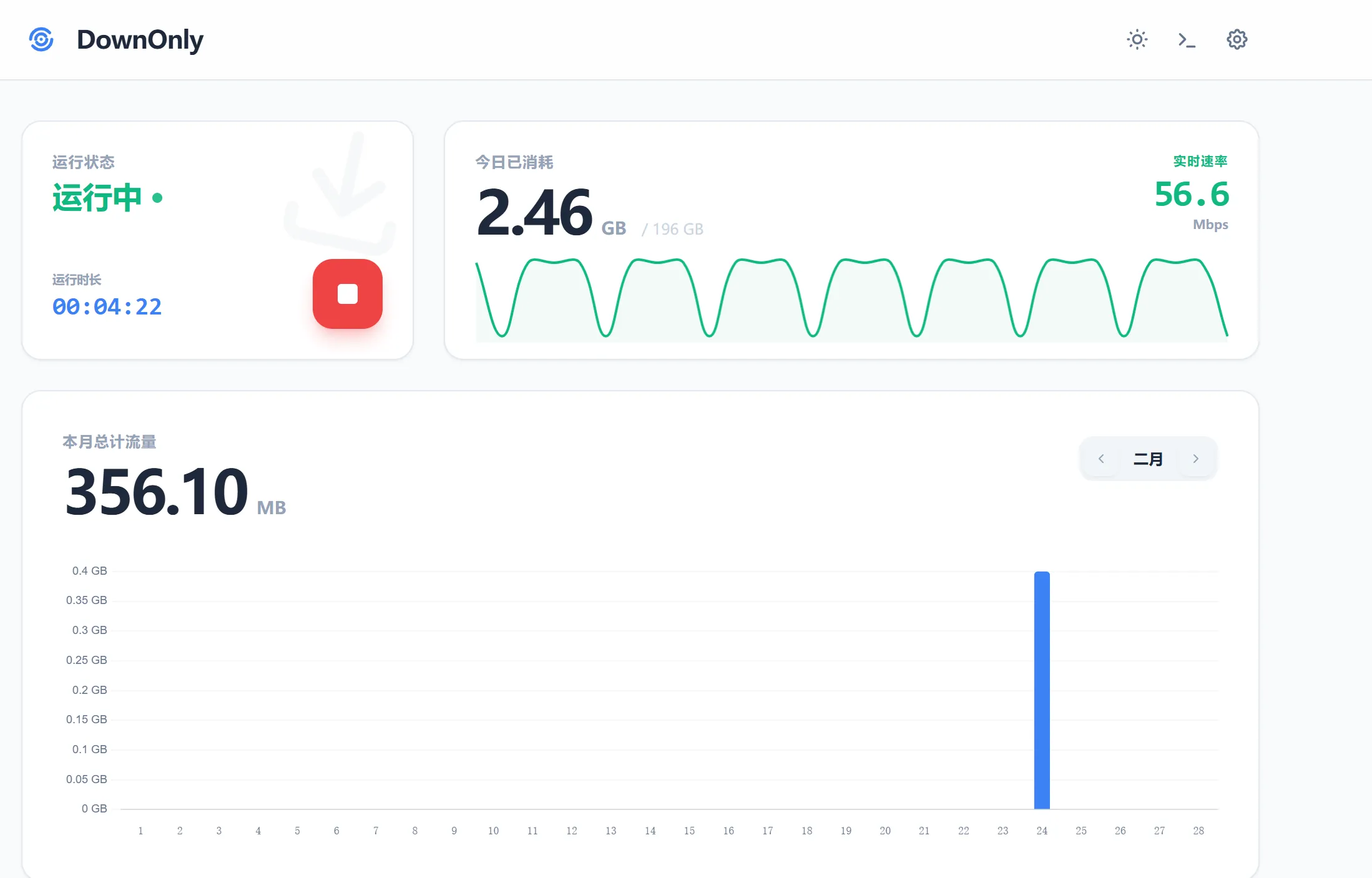
带web界面,推荐
dockerservices:
  downonly:
    image: ghcr.io/echoping07/downonly:latest
    container_name: downonly
    ports:
      - "18200:8080"
    volumes:
      - ./data:/app/data
      - /etc/localtime:/etc/localtime:ro  # 同步宿主机时区
    restart: always
下载地址配置
jshttp://updates-http.cdn-apple.com/2019WinterFCS/fullrestores/041-39257/32129B6C-292C-11E9-9E72-4511412B0A59/iPhone_4.7_12.1.4_16D57_Restore.ipsw
https://mirrors.aliyun.com/ubuntu-releases/22.04.5/ubuntu-22.04.5-desktop-amd64.iso
https://mirrors.tuna.tsinghua.edu.cn/ubuntu-releases/22.04.5/ubuntu-22.04.5-desktop-amd64.iso
https://mirrors.huaweicloud.com/centos-stream/10-stream/BaseOS/aarch64/iso/CentOS-Stream-10-20260309.0-aarch64-dvd1.iso
http://iso-osm.mirrors.aliyuncs.com/ubuntu-releases/20.04.6/ubuntu-20.04.6-desktop-amd64.iso
http://down.daaobaowen.cn:12817/dngs/windows_10_professional_2026.iso
https://mirrors.ustc.edu.cn/opensuse/distribution/leap/16.0/offline/Leap-16.0-offline-installer-x86_64.install.iso
本文作者:zhusenlin
本文链接:
版权声明:本博客所有文章除特别声明外,均采用 版权所有:zhusenlin 许可协议。转载请注明出处!
目录