请注意,本文编写于 170 天前,最后修改于 170 天前,其中某些信息可能已经过时。
目录
使用docker安装青龙面板

yamlservices:
  web:
    container_name: qinglong
    image: whyour/qinglong:latest # 基于 Debian 的版本:whyour/qinglong:debian
    volumes:
      - ./data:/ql/data
    ports:
      - "5700:5700"
    environment:
      QlBaseUrl: '/' # 部署路径非必须,以斜杠开头和结尾,比如 /test/
    restart: unless-stopped
安装依赖
nodejs依赖
jscrypto-js
prettytable
dotenv
jsdom
date-fns
tough-cookie
tslib
ws@7.4.3
ts-md5
jsdom -g
jieba
fs
form-data
json5
global-agent
png-js
@types/node
require
typescript
js-base64
axios
moment
request
ds
crypto -g
-g typescipt
https
proxy
ql
qs
common
cjs
sharp
jsencrypt
node-rsa
xmldom
socks-proxy-agent
python依赖
jsrequests
canvas
ping3
jieba
PyExecJS
aiohttp
redis
httpx
success
bs4
Crypto
openai
dashscope
安装测速相关依赖
bash# 1. 更新Alpine的apk源(换国内源,加快速度)
echo "https://mirrors.aliyun.com/alpine/v3.18/main/" > /etc/apk/repositories
echo "https://mirrors.aliyun.com/alpine/v3.18/community/" >> /etc/apk/repositories

# 2. 更新apk缓存并安装依赖
apk update && apk add --no-cache \
    chromium \
    chromium-chromedriver \
    wget \
    unzip \
    libstdc++ \
    libgcc
# 3. 验证chromedriver是否安装成功
chromedriver --version
chromium --version
# 4. 安装selenium
pip3 install selenium -i https://pypi.tuna.tsinghua.edu.cn/simple
speedtest测速脚本
py#!/usr/bin/env python3
# -*- coding: utf-8 -*-
"""
青龙面板测速脚本(网址可配置变量版)
修改下方SPEED_TEST_URL变量即可更换测速网站,无需改核心逻辑
"""
import time
import re
from selenium import webdriver
from selenium.webdriver.common.by import By
from selenium.webdriver.chrome.options import Options
from selenium.common.exceptions import NoSuchElementException
from selenium.webdriver.chrome.service import Service

# ===================== 可配置变量(重点修改这里) =====================
SPEED_TEST_URL = "https://speedtest.com/"  # 测速网站网址,改这里即可
# ====================================================================

def is_number(s):
    """判断是否为数字(含小数)"""
    try:
        float(s)
        return True
    except:
        return False

def get_element_text(driver, elem_id):
    """安全获取元素的innerText"""
    try:
        elem = driver.find_element(By.ID, elem_id)
        return elem.get_attribute("innerText").strip()
    except:
        return ""

def get_progress_width(driver):
    """精准获取进度条宽度(支持小数,多次提取去重)"""
    try:
        progress_elem = driver.find_element(By.ID, "progress")
        raw_style = progress_elem.get_attribute("style").strip()
        width_match = re.search(r'width:\s*(\d+\.?\d*)%', raw_style)

        if width_match:
            width_value = float(width_match.group(1))
            return round(width_value, 1), raw_style
        return 0.0, raw_style
    except Exception as e:
        return 0.0, f"提取失败:{str(e)}"

def speed_test():
    try:
        # ========== 浏览器配置 ==========
        chrome_options = Options()
        chrome_options.add_argument("--headless=new")
        chrome_options.add_argument("--no-sandbox")
        chrome_options.add_argument("--disable-dev-shm-usage")
        chrome_options.add_argument("--disable-gpu")
        chrome_options.add_argument("--no-zygote")
        chrome_options.add_argument("--single-process")
        chrome_options.binary_location = "/usr/bin/chromium"
        chrome_options.add_experimental_option("excludeSwitches", ["enable-automation"])
        chrome_options.add_experimental_option('useAutomationExtension', False)

        # ========== 驱动初始化 ==========
        print("[1/6] 初始化浏览器驱动...")
        chrome_service = Service(executable_path="/usr/bin/chromedriver")
        driver = webdriver.Chrome(service=chrome_service, options=chrome_options)
        driver.set_page_load_timeout(60)
        driver.implicitly_wait(20)

        # ========== 访问测速网站(使用变量) ==========
        print(f"[2/6] 访问测速网站:{SPEED_TEST_URL}...")
        driver.get(SPEED_TEST_URL)  # 替换为变量
        time.sleep(8)  # 等待页面完全加载

        # ========== 强制触发测速 ==========
        print("[3/6] 强制触发测速(调用startStop())...")
        driver.execute_script("startStop();")
        print("✅ 已执行startStop()函数,开始测速")

        # ========== 等待进度条到100% ==========
        print("[4/6] 等待测速进度条完成(最多120秒)...")
        max_wait = 120
        wait_time = 0
        last_progress = 0.0

        while wait_time < max_wait:
            progress_list = []
            raw_style_list = []
            for _ in range(3):
                p, s = get_progress_width(driver)
                progress_list.append(p)
                raw_style_list.append(s)
                time.sleep(0.1)

            current_progress = max(progress_list)
            raw_style = raw_style_list[progress_list.index(current_progress)]

            if current_progress > last_progress or wait_time % 4 == 0:
                print(f"  进度条:{current_progress}% | 原始style:{raw_style} | 等待时间:{wait_time}/{max_wait}秒")
                last_progress = current_progress

            if current_progress >= 100.0:
                print("✅ 进度条已到100%,测速完全结束")
                break

            time.sleep(1)
            wait_time += 1

        if last_progress < 100.0:
            print(f"⚠️  进度条未到100%(当前{last_progress}%),已超时,提取当前数值")

        # ========== 提取最终数值 ==========
        print("[5/6] 提取最终测速结果...")
        dl_value = get_element_text(driver, "dlText")
        download_speed = f"{dl_value} Mbps" if is_number(dl_value) else f"无效数值({dl_value})"

        ul_value = get_element_text(driver, "ulText")
        upload_speed = f"{ul_value} Mbps" if is_number(ul_value) else f"无效数值({ul_value})"

        ping_value = get_element_text(driver, "pingText")
        ping = f"{ping_value} ms" if is_number(ping_value) else f"无效数值({ping_value})"

        # ========== 输出最终结果 ==========
        print("\n===== 【F12一致-精准最终结果】 ======")
        print(f"📥 下载速度:{download_speed}")
        print(f"📤 上传速度:{upload_speed}")
        print(f"📶 网络延迟:{ping}")
        print("======================================\n")

        driver.quit()
        return True

    except Exception as e:
        print(f"\n❌ 测速失败:{str(e)}")
        import traceback
        print(f"❌ 详细报错:{traceback.format_exc()}")
        try:
            driver.quit()
        except:
            pass
        return False

if __name__ == "__main__":
    speed_test()
创建定时任务
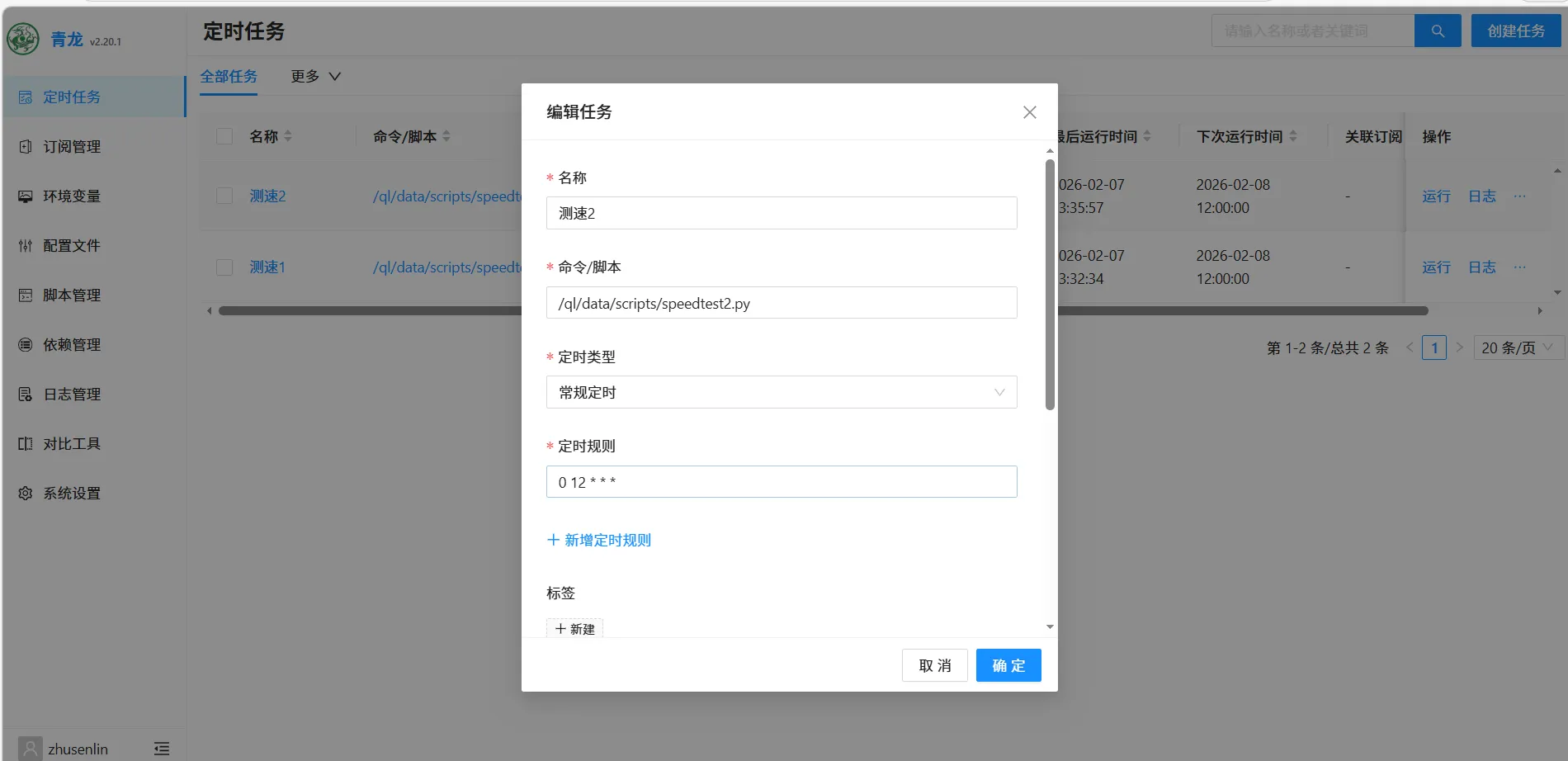
脚本路径不会填可以通过ssh查询
ssh# 查找speedtest相关的脚本文件(不管名字是speedtest.py还是speed_test.py)
find /ql -name "*speedtest*.py"
本文作者:zhusenlin
本文链接:
版权声明:本博客所有文章除特别声明外,均采用 版权所有:zhusenlin 许可协议。转载请注明出处!
目录